AI TOOL / #03920
ChatGPTalk Sidebar
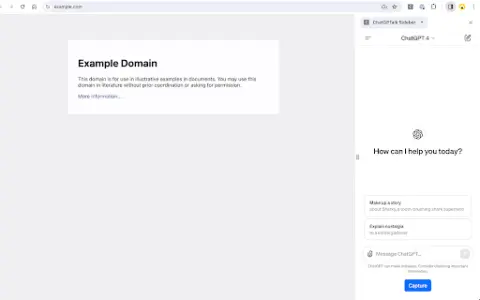
The ChatGPT integration in the sidebar facilitates text capture and interaction.
Introduction
ChatGPT integration in a sidebar for easy text capture and interaction.
What is the ChatGPTTalk Sidebar AI Chrome extension/plug-in?
The ChatGPTTalk Sidebar extension enhances the web browsing experience by integrating ChatGPT into a convenient sidebar. It allows users to extract text from web pages or YouTube subtitles and automatically copy it into the ChatGPT input field for generating summaries or performing other interactions. This extension also includes prompt templates and intelligent text segmentation features, which make it easier to work with longer documents.
How to use the ChatGPTTalk Sidebar AI Chrome extension/plug-in?
Install the ChatGPTTalk Sidebar extension. Open a web page or a YouTube video, and then click the “Capture” button in the sidebar to extract the text or subtitles. The extracted text will be automatically copied and pasted into the ChatGPT input field, along with a predefined prompt template. You can then interact with ChatGPT as needed.
The core functions of the ChatGPTTalk Sidebar AI Chrome extension/plugin
Integration of ChatGPT
Text capture
prompt template
YouTube subtitles
Intelligent text segmentation
Related
transkrip.xyz
AI-powered audio and video transcription services for Indonesian users.
Salad Transcription API
We offer distributed GPU cloud services that integrate computing, storage, and low-cost deployment solutions.
Video2Text
Video2Text is used for transcribing videos; realtime.at is designed to capture expired domain names.
Cockatoo
An AI-powered platform designed for audio and video transcription as well as translation services.
Tali AI
A Chrome extension tool for dictating medical notes and accessing medical databases within EHR systems.
SpaceGrapher
Download, transcribe, and summarize the audio recordings from Twitter Spaces.