AI TOOL / #04050
AI Roundtable
Ask a question and receive answers from multiple AI assistants.
Introduction
Ask one question, get answers from multiple AI assistants.
What is a Multiple AI Assistants Chrome extension/plug-in?
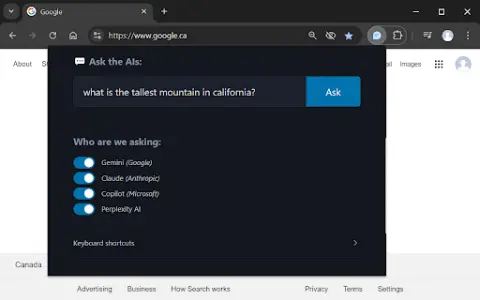
This website allows users to submit questions at once and receive answers from multiple AI assistants. Users can customize which assistant they want to use for their queries. The website also provides keyboard shortcuts, making it easy to access various functions quickly.
How to use the Multiple AI Assistants Chrome extension?
Use the shortcut keys Ctrl/Cmd + Shift + Q to open the query window and start typing your question. Use Alt + 1 to switch to Gemini, Alt + 2 to switch to Claude, Alt + 3 to switch to Copilot, and Alt + 4 to switch to ChatGPT.
The core functions of various AI Assistant extensions/plugins for Chrome.
Query multiple AI assistants simultaneously
It is possible to customize the selection of AI assistants.
Convenient and fast keyboard shortcuts
Related
ebanqo.com
Conversational AI platform that automates sales and support across multiple messaging channels.
I IMAGINE
A domain-specific AI chatbot for business management, equipped with personalized AI capabilities.
Hi Chat Assistant
Artificial intelligence sales chatbot for websites and WhatsApp to automate customer service and increase sales.
Diddo AI
A platform used for creating custom ChatGPT chatbots, designed for business automation and customer service purposes.
Guest Guru
An AI chatbot that automates communication between Airbnb hosts and their guests.
WiiChat AI ChatBot
WiiChat is a platform designed for creating AI chatbots that can operate across multiple channels.