AI TOOL / #04897
Patent Highlighter
Browser extensions that highlight technical information in patents while suppressing legal jargon.
Introduction
Browser extension that highlights technical information in patents, suppressing legal jargon.
What is the Patent Highlighter AI Chrome extension/plug-in?
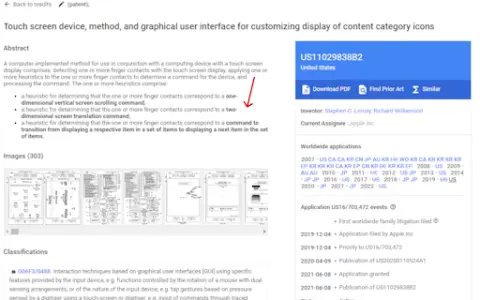
The Patent Highlighter is a browser extension designed to enhance the efficiency of reading and understanding patents. It highlights technical information within patent documents while suppressing redundant legal terminology, allowing users to quickly identify key inventions and technical details without altering the original text written by the inventors.
How to use the Patent Highlighter AI Chrome extension/plug-in?
1. Open a patent on Google Patents.
2. Click the patent highlighter extension icon in your browser.
3. Click the "Highlight" button.
4. Wait for the important information to be highlighted.
The core functionality of the Patent Highlighter AI Chrome extension/plugin
Highlight the technical information contained in the patent.
Reducing the use of redundant legal language
Maintain the original text written by the inventor.
Browser extension integration
Related
MockLive AI
AI-assisted mock interviews and oral practice sessions
Hyperagent
Assign tasks to the fleet of intelligent agents to deliver the final products.
Quiver GTM
Marketing system for the developer tools team
Hookest
Short video popular opening material library
PixelCrew
Multi-agent collaboration for designing prototypes
Naise AI
Social Media Influencer PR Integrated Marketing Intelligent Agent