AI TOOL / #05985
Voiceboost – ChatGPT
A Chrome extension designed for voice-controlled interaction with ChatGPT.
Introduction
Chrome extension for voice-controlled ChatGPT interaction.
What is the Voiceboost AI Chrome extension/plug-in?
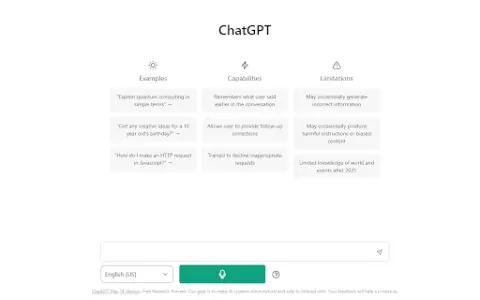
Voiceboost is a Chrome extension that allows users to interact with ChatGPT via voice commands. It adds a button below the input field; by clicking this button, the system captures the user’s verbal inquiries and sends them to ChatGPT for responses. This provides a hands-free alternative for entering text.
How to use the Voiceboost AI Chrome extension/plug-in?
Click the button added below the input area to start recording your voice input. Alternatively, use the keyboard shortcuts: Ctrl+Shift+S (Windows) or Command+Shift+S (Mac) to begin recording, and Ctrl+Shift+E (Windows) or Command+Shift+E (Mac) to stop and submit the recording. Make sure to grant microphone access when prompted.
The core functionality of the Voiceboost AI Chrome extension/plugin
Voice input for ChatGPT
Keyboard shortcuts for voice capture and submission
Related
fwd2cal
An AI-based calendar assistant that adds events to the Google Calendar by forwarding emails.
BuddyBeep
An AI-powered Chrome extension that enables intelligent browsing, providing content summaries and assistance with knowledge management.
AndyAi
Through automation and an intuitive user interface, AndyAi is an AI assistant that revolutionizes system management.
MARK•R
An AI browser extension for exploring interactive web content and performing conversational queries.
Omnibot
Omnibot is an AI platform that enables the operation of Large Language Models within web browsers, and it features local processing capabilities as well as privacy safeguards.
Herodot AI
Herodotus is an AI travel guide that shares stories about the places depicted on maps.