AI TOOL / #06235
Two Way Voice for Bard ™
Google Bard's voice interaction extension supports hands-free conversations and multi-language capabilities.
Introduction
Voice interaction extension for Google Bard, enabling hands-free conversations and multilingual support.
What is Google Bard Voice Extension ai chrome extension/plugin?
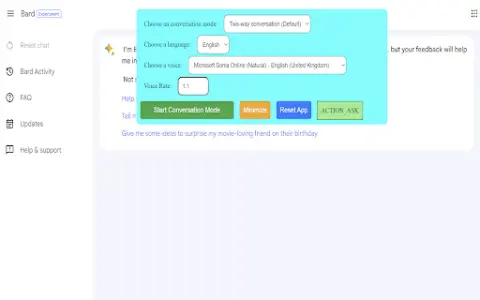
This extension is for the Bard website and allows users to interact with Google Bard via voice. It supports voice questions and answers, providing a hands-free and convenient way to obtain information, discuss ideas and explore topics. The extension supports multiple conversation modes, including two-way voice interaction, voice input text reply, and text input voice reply. It also supports voice questions in multiple languages such as Chinese and Korean.
How to use Google Bard Voice Extension ai chrome extension/plugin?
After installing the extension, simply activate conversation mode in the Bard website. The extension automatically manages the turns between questions and responses. There are three conversation modes to choose from: two-way speech, voice input text reply, or text input voice reply.
Google Bard Voice Extension ai chrome extension/plugin core functionality
Voice-based questions and answers
Multiple conversation modes
Multi-language support (e.g. Chinese, Korean)
Automatic turn management in conversation mode
Related
MacWK
It is understood that MacWK was shut down on October 5, 2022. Currently, the website is no longer accessible. The link to this site has been removed from our listings; only introductory articles related to it have been retained. MacWK was a high-quality website dedicated to providing downloads of Mac application resources, offering a large collection of green, cracked versions of popular Mac applications.
Quick Search for Insect Tribe
Insect Tribe is a search-themed website that provides quick access to dozens of popular search engines. By integrating these engines onto a single page, it enables users to switch between them more quickly and conduct searches in a more efficient and accurate manner.
Snapdrop
Snapdrop is an open source online file transfer tool that can be used on any platform such as Windows, Mac, Linux, iOS, and Android. As long as your device has a browser, you can use it to transfer files.
New Godwit
Open-source AI-based native email client
New Command Code
Programming Agent specially polished for open source models
New AI Web Maker
Describing your business is essentially the same as creating a corporate website.