AI TOOL / #07222
ReadImage
Extract, edit, and copy text from images on web pages.
Introduction
Extracts, edits, and copies text from images on web pages.
What is Image Text Extractor ai chrome extension/plugin?
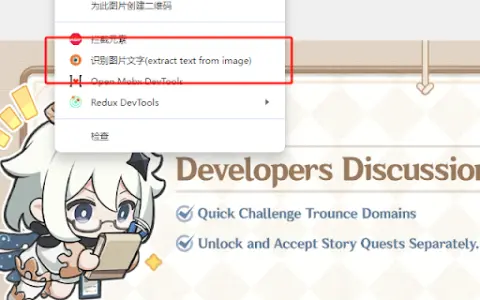
This extension allows users to extract text from images displayed on web pages. It supports common image formats such as jpg, jpeg, png and bmp. After extraction, the text can be edited and copied.
How to use Image Text Extractor ai chrome extension/plugin?
Hover your mouse over the image, right-click and select "Extract text from image". Press "Ctrl + Q" to view the extracted text on the extension page, where it can be edited and copied.
Image Text Extractor ai chrome extension/plugin core features
Extract text from images on web pages
Edit extracted text
Copy extracted text
Related
Stud.AI
Stud.AI is a learning companion application that features AI-powered tools for learning and collaboration.
Studyy – Instant Flashcards
An app that instantly creates flashcards from scanned text for efficient learning.
Autogon AI
A code-free artificial intelligence platform that helps companies build, deploy, and expand their AI models.
Unriddle
An AI research assistant for faster understanding, organizing and writing scientific documents.
CapyParse
An AI-powered converter that transforms PDF files and images into CSV/Excel formats, specifically designed to assist in the processing of bank statements.
formNinja
FormNinja utilizes AI and document analysis to automate the process of filling out web forms.