AI TOOL / #07462
Vision AI
A Chrome extension that enables AI-driven insights based on screenshot data.
Introduction
Chrome extension for AI-powered insights from screenshots.
What is a Vision AI Chrome extension/plug-in?
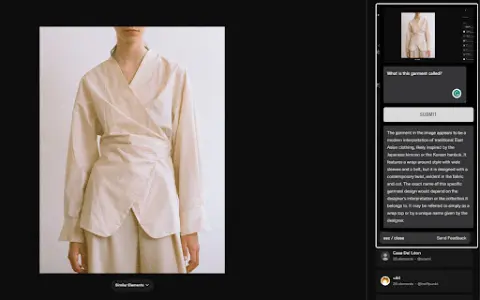
Visual AI is a Chrome extension that combines screenshot functionality with AI-driven insights to enhance online information search. It allows users to capture any portion of a web page, add notes or questions, and receive AI-generated responses based on the context of the captured image.
How to use the Vision AI Chrome extension/plug-in?
Install the Visual AI Chrome extension. Use CTRL + SHIFT + Y to take a screenshot, and then add any notes or questions you have. Visual AI will analyze the screenshot and provide an AI-generated response.
The core functions of the Vision AI Chrome extension/plugin
Screenshot capture
Interactive AI Suggestions
Seamless browser integration
Suitable for a wide range of applications in various fields
Privacy and Security
Related
TrustDoc
An AI-powered platform that provides document organization, assessment, verification, and management capabilities.
MEETCS MEGA PROCTORING
A remote proctoring solution designed for online tests, quizzes, and examinations, aimed at preventing cheating.
Roketfy
An AI-driven platform that assists Etsy sellers in utilizing intelligent tools and data to enhance their sales efforts.
SEO All Stars tools: in 1 place ⭐️
A free AI-powered SEO toolkit for developers and SEO experts.
Skeptic Reader
A web plugin that can detect biases and logical errors in real time.
1MillionResume
An AI-based resume generator that offers templates, writing assistance, and ATS optimization tools.