AI TOOL / #08846
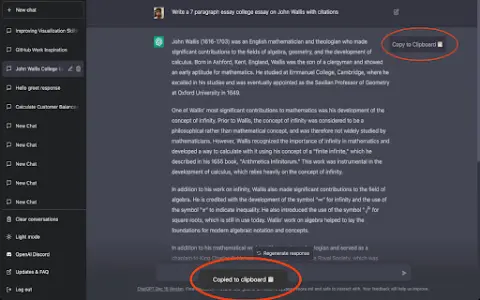
Copy for Chat GPT
An extension used to copy ChatGPT responses and check for plagiarism.
Introduction
Extension to copy ChatGPT responses and check for plagiarism.
What is the Plagiarism Detector Extension for Chrome – an extension/plug-in for Google Chrome?
This extension allows you to copy the responses generated by ChatGPT by clicking a button or using the CMD+K shortcut key, and then have those responses checked by plagiarism detection tools.
How to use the Plagiarism Detector Extension for Chrome?
You can use this extension by clicking the copy button on ChatGPT’s response or by pressing CMD+K. The copied text will be automatically checked to determine whether it contains any plagiarized content.
The core functionality of the Plagiarism Detector Extension for Chrome.
One-click to copy the response from ChatGPT
Use the CMD+K shortcut key to copy.
Automatic plagiarism detection
Related
Toucan
An AI chat assistant based on GPT-4, offering a variety of task templates and AI-based image generation capabilities.
GenerateSong AI
AI tools generate high-quality music based on text and lyrics.
AI Song
An AI-based music creation platform that allows users to create and download music generated by AI for free.
Song.do
Free AI song generator that converts text into music.
Chorus
Chorus is a song creation app that incorporates AI-assisted features, offering tools for writing lyrics, creating rhymes, selecting chords, and enabling collaborative work.
Loudly AI Music Generator
An AI-powered music platform for creating, customizing, and publishing high-quality music.